
Complete Google Reviews Guide for Business Owners
A Google review is the public rating and comment a customer leaves on your Business Profile, where anyone searching for you can see it. This guide covers the whole cycle: how the review system works, how to ask so that people actually write one, how to reply, and what Google’s policies let you do about the ones you would rather not have.
Why Google Reviews Matter for Your Business
What reviews affect, and the research behind it
SEO Impact
Prominence
reviews feed one of Google's three ranking factors
Google says review count and review score factor into local search ranking.
Trust Factor
88%
prefer businesses that reply to ALL reviews
BrightLocal's 2024 survey shows overwhelming preference for responsive businesses.
Conversion Impact
Choice
searchers compare ratings before they call
A higher rating makes it more likely that a searcher picks you over the listing next to you.
Revenue Growth
5-9%
revenue increase per star
Harvard Business School research on restaurant ratings.
What Are Google Reviews?
Google reviews are public ratings and written feedback that customers leave on your Google Business Profile. They appear across Google's ecosystem—in Google Search, Google Maps, and when someone searches for your business directly.
The Technical Foundation
When a customer leaves a review, it's permanently stored in Google's infrastructure and becomes immediately visible to anyone searching for your business. According to Google's 2024 data, reviews are displayed on:
- Google Search: When users search "[your business name]" or "[service] near me"
- Google Maps: Your pin and business listing
- Google Business Profile: Your full profile page
- Knowledge Panel: The information card on the right side of search results
Two Types of Reviews
Customer Reviews
The star rating (1-5 stars) and optional written feedback that customers provide. These reviews can include photos, specific service mentions, and detailed experiences. Photos and specific details make a review more useful to the next customer reading it.
Business Responses
Your replies to customer reviews. This is where many businesses fall short, yet 88% of consumers prefer businesses that reply to ALL reviews, according to BrightLocal's 2024 survey.
Getting More Google Reviews
Let me show you what actually works to collect reviews ethically and at scale.
QR Code Methods
The game-changer approach
One scan
opens your review form directly, no searching
Always visible
on the counter, table or receipt, for every customer
In-Person Asking
Often the most effective method
Personal
a direct ask, at a moment the customer is waiting anyway
"Would you mind taking 60 seconds right now to leave us a Google review while I prepare your receipt? Just scan this QR code."
Why it works: Specific timing, immediate action, easy method, idle waiting time.
Email Templates
Automated follow-up system
Scalable
one template, every customer
Measurable
your email tool shows opens and clicks
Subject: Quick question about your [service] experience?
Send 24-48 hours after service completion for best results.
SMS Templates
Hard to miss
Direct
lands where customers already read messages
Short
one line and one link
"Hi [Name], thanks for visiting [Business]! Mind leaving us a quick Google review? [Short Link] - Team [Business]"
SMS tends to get noticed sooner than email but costs more. Use it for high-value customers.
Managing Your Google Reviews
Most business owners view reviews, panic at negative ones, and forget to reply. Let me show you what actually works.
5-Star Reviews (Appreciation + Specificity)
"Thank you [Name], we're thrilled you enjoyed [specific thing they mentioned]! We'll make sure [staff member/feature] knows you appreciated their work. Hope to see you again soon!"
Average length that performs best: 35-55 words
3-Star Reviews (Acknowledge + Action)
"We appreciate your honest feedback, [Name]. [Specific acknowledgment of their concern]. We're taking action by [specific improvement]. Would you give us another chance to exceed your expectations?"
A reply that names the fix gives the reviewer a reason to update their rating.
1-2 Star Reviews (Empathy + Resolution + Offline)
"We're truly sorry your experience didn't meet expectations, [Name]. [Specific acknowledgment]. We'd like to make this right—please contact us at [email/phone] so we can resolve this personally. Thank you for giving us the chance to improve."
⚠️ Never argue publicly. Every future customer reads the exchange, and an argument costs you more trust than the original review.
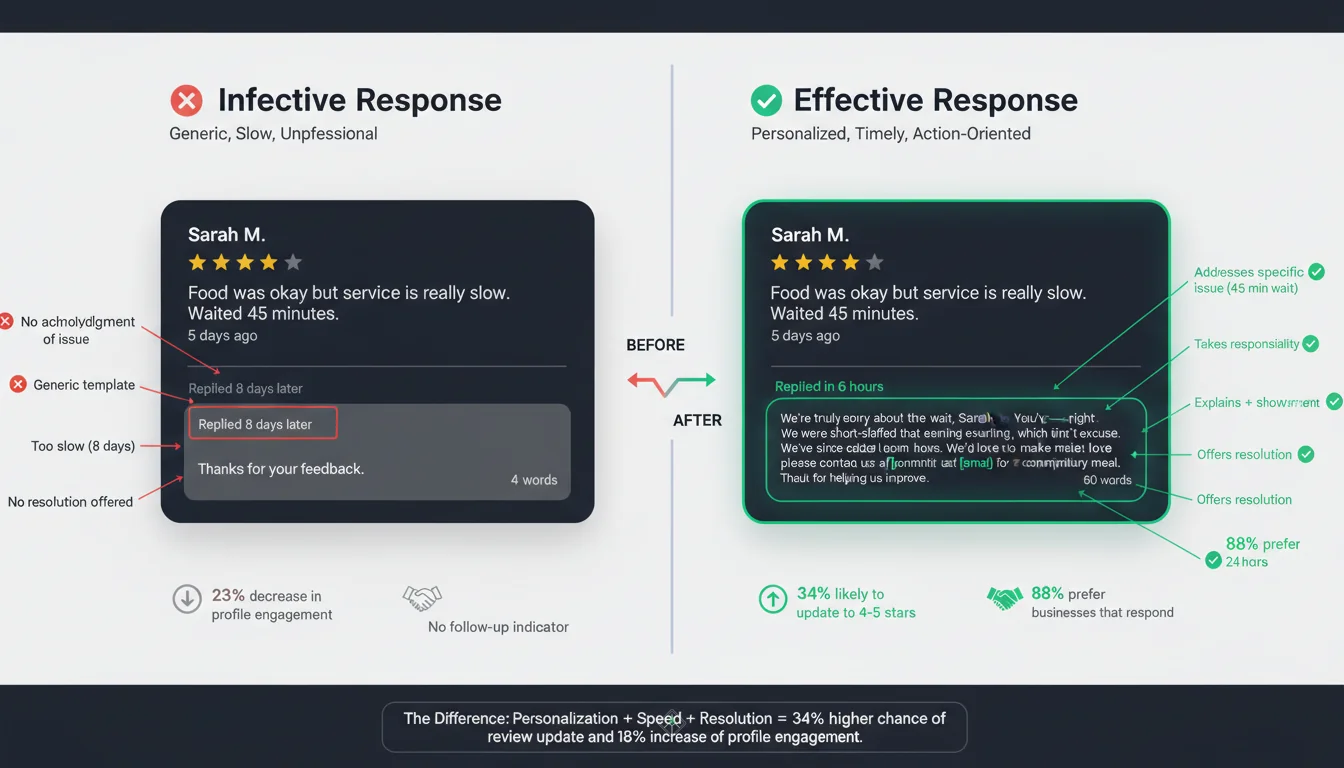
Response Timing Matters
Best
< 24 hours
Good
24-72 hours
Too slow
> 7 days
A quick reply reaches the customer while the visit is still fresh, and shows every later reader that you are paying attention.
Need help setting up your Google Business Profile?
Read our complete Google Maps business setup guide →Advanced Review Strategies
This is where the most active businesses separate themselves.
AI-Powered Review Templates
AI drafts the first version; you edit it and post it yourself
Why AI Works
- Consistent tone and professionalism across all responses
- Drafts a reply for every review without fatigue
- Analyzes sentiment and tailors response appropriately
- Drafts are ready in seconds, whenever you sit down to reply
Faster
replies, because the first draft is done
Every review
gets a draft, not just the easy ones
Your voice
you edit before anything is posted
Competitive Benchmarking
You can't improve what you don't measure. Here's a simple framework (example figures):
| Metric | Your Business | Competitor Avg | Gap | Target |
|---|---|---|---|---|
| Total Reviews | 87 | 143 | -56 | 150 |
| Avg Rating | 4.2 | 4.5 | -0.3 | 4.6 |
| Reviews/Month | 3 | 8 | -5 | 10 |
| Response Rate | 40% | 75% | -35% | 90% |
Whitespark's 2025 Rule:
Aim for 30% MORE positive reviews than your competitors.
FAQ: Your Google Reviews Questions Answered
Can I delete negative Google reviews?
No, you cannot delete reviews left by customers—even if they're negative, inaccurate, or unfair. Only Google can remove reviews, and only if they violate Google's review policies. What you CAN do: • Flag reviews that violate policies (fake, spam, profanity, off-topic) • Respond professionally to provide context • Resolve the issue with the customer (many update their review to positive) Google removes flagged reviews that clearly violate its policies. Legitimate negative reviews, even if harsh, stay. Best approach: Respond professionally, resolve offline, and ask if they'd consider updating their review after you've made things right.
How long do Google reviews last?
Google reviews are permanent unless: 1. The reviewer deletes their own review (they can do this anytime) 2. The reviewer edits their review (they can do this anytime) 3. Google removes it for policy violation 4. The business closes permanently In practice, most reviews stay visible for years. Why this matters: Every review you get today will likely be visible for years. This is why consistent quality and response matter—you're building a permanent public reputation.
Do Google reviews affect SEO?
Yes. Google says review count and review score factor into local search ranking. Specific SEO factors: • Review quantity: more reviews strengthen your prominence • Review recency: a steady flow of recent reviews signals an active business • Average rating: a higher rating helps both ranking and click-through • Review keywords: Reviews mentioning specific services help rank for those terms • Review velocity: Steady monthly reviews signal active, growing business The effects compound: more recent, specific reviews improve both where you appear and how often searchers choose you.
Can I pay for Google reviews?
No, absolutely not. Paying for positive reviews violates Google's policies and can result in: • Review removal • Business Profile suspension • Permanent loss of reviews • Inability to create new profiles • Loss of trust when caught What IS allowed: • Paying for review collection tools (QR codes, email automation, software) • Asking every customer for an honest review What is NOT allowed: • Paying reviewers, or offering discounts, gifts or prize draws for reviews of any rating • Asking only the customers you expect to be happy • Buying fake reviews from services Don't risk it. Focus on making review submission easy for real customers.
How do I respond to fake reviews?
Step 1: Identify if it's actually fake True fake reviews have: • Reviewer never visited your business • Details that don't match (wrong location, services you don't offer) • Posted by competitor or disgruntled employee • Pattern of fake reviews (same reviewer hits multiple businesses in one day) Step 2: Flag the review Go to Google Business Profile dashboard → Find review → Three-dot menu → "Flag as inappropriate" → Select violation type → Provide detailed evidence Step 3: Post a public response while you wait Don't attack the reviewer, but provide facts: "We've reviewed our records and don't have any record of serving someone by this name on the date mentioned." Step 4: Follow up if not removed Google responds in 3-7 business days typically. If not removed with strong evidence, re-submit. What to expect: • Clearly fake, with evidence: the strongest case for removal • Suspicious but uncertain: Google may leave it up Meanwhile: Focus on generating more positive reviews to minimize impact.
What is a good Google review rating?
Minimum viable: 4.0 stars – many consumers filter out low-rated businesses Competitive: 4.3-4.5 stars – a strong, believable rating Excellence zone: 4.6-4.8 stars – signals consistent excellence Suspiciously perfect: 4.9-5.0 stars – If you have 50+ reviews and perfect 5.0, consumers might suspect fake reviews The sweet spot: 4.5-4.7 stars with 100+ reviews This signals: • Lots of experience (volume) • Consistent quality (high rating) • Authentic (a few negative reviews show it's real) What is normal varies by category, so compare yourself with the businesses Google shows next to you. What matters as much as rating: review velocity and recency. A business with a slightly lower rating and a steady flow of new reviews can outrank one with a higher rating and no recent reviews.
How many reviews do I need?
Minimum credibility threshold: 10-15 reviews Below this, consumers see you as "too new" to trust fully. Competitive threshold: 50+ reviews At this point, you have enough volume to appear credible and compete. Authority threshold: 100+ reviews Consumer hesitation dramatically decreases. You're seen as established and trusted. Dominance threshold: 200+ reviews Top-tier visibility. You'll rank for "near me" searches consistently. Reality check: what counts as "enough" depends on your category and city. Look at the review counts of the businesses Google shows above you; that gap is your real target. Monthly targets: • New business (0-20 reviews): 8-12 reviews/month for 6 months • Established (20-50 reviews): 6-10 reviews/month • Mature (50+ reviews): 4-8 reviews/month to maintain velocity The 30% rule (Whitespark 2025): Aim for 30% more reviews than your closest competitors.
Can customers change their reviews?
Yes, customers can edit their review at any time. What they can change: • Star rating (increase or decrease) • Written text (edit, add, or remove) • Photos (add, remove) • Complete deletion (they can delete entirely) Why this matters: Your response to negative reviews can influence whether customers update them. Reply quickly: a prompt, helpful reply to a negative review, followed by fixing the problem offline, gives the customer a reason to update it. Don't see negative reviews as permanent. See them as opportunities to show you care.
Do review responses matter?
Absolutely. Review responses might be more important than the reviews themselves. The data: • 88% of consumers prefer businesses that respond to ALL reviews (BrightLocal 2024) • Replies are read by everyone who reads the review, not just the reviewer What responses do: 1. Show you care – Even responding to negative reviews shows you take feedback seriously 2. Provide context – Your response tells your side of the story 3. Build trust – Consistent responses signal you're engaged and professional 4. Improve SEO – Responses add keyword-rich content to your profile 5. Influence updates – Thoughtful responses often lead to rating increases The competitive advantage: many businesses leave reviews unanswered, so replying to every one sets you apart. Response effort = 2-3 minutes per review. ROI = massive.
How do I get my first review?
Getting that first review is the hardest. Here's the proven system: Step 1: Identify your "super fans" Customers who have: • Used your service multiple times • Complimented you verbally • Referred friends/family • Are friendly and communicative Step 2: Ask in person Don't send an email—ask face-to-face: "[Name], I really appreciate your loyalty. We're building our online presence, and honest reviews really help. Would you mind taking 60 seconds to leave us a Google review? I can bring up the page on my phone right now." Hand them your phone with review page open, or show QR code. Step 3: Make it easy Have exact steps ready: 1. Scan this QR code 2. Select star rating 3. Write 1-2 sentences 4. Submit Step 4: Follow up gently If they say "yes but later," send direct review link via SMS within 2 hours. A simple first-month timeline: • Day 1: Ask every customer in person at checkout • Day 3: Send SMS to your last 10 customers • Day 7: Email your last 20 customers • Week 2-4: Implement QR codes at checkout → Steady flow begins
Want to learn more?
Your Google Reviews Action Plan
If you've read this far, you understand: Google reviews aren't just nice to have—they're the foundation of local search visibility, customer trust, and revenue growth in 2025.
Prominence
reviews feed this Google ranking factor
88%
prefer response to ALL reviews (BrightLocal)
5-9%
revenue per extra star (Harvard Business School)
Replies
show every reader you are listening
Analyze Your Current Performance
15 minutes
Go to your Google Business Profile dashboard right now and compare to your top 3 competitors. What's the gap?
Analyze Your Performance →Implement Easy Review Collection
30 minutes setup
Generate your Google review QR code, print at 3"×3" minimum, place at checkout counter or table. Train staff with the proven script.
What to watch:
New reviews per month, before and after the QR code goes up
Get AI-Powered Review Templates
10 minutes setup
Stop crafting review responses from scratch. Use AI to draft responses in your brand voice and respond within hours (not days).
What to watch:
Your response rate and how quickly you reply
A 90-Day Plan
- Review link and QR code in place
- Ask every customer
- Reply to every review
- Keep a steady monthly flow
- Note which services reviews mention
- Check profile views in your performance report
- Compare with nearby competitors
- Refresh photos and posts
- Track calls and direction requests
What to track over 90 days: new reviews per month, average rating, response rate, and the calls, direction requests and profile views in your Business Profile performance report.
Don't Wait. Your Competitors Aren't.
Every day you delay is another day your competitors gain reviews, improve rankings, and capture customers who should be choosing you. Your future customers are searching right now.
Sources & References
- Local Consumer Review Survey- BrightLocal
- Local Search Ranking Factors- Whitespark
- Guidelines for representing your business on Google- Google
- Prohibited & restricted content- Google
Explore MapLift Features
Discover the tools that help you dominate local search and collect better reviews.
Keep reading
Ready to act on this? AI review templates — keyword-rich review prompts a customer can start from, generated per business.