
15 Google My Business Tips That Tripled Traffic in 2025
70 percent of businesses get GMB wrong. Steal these 15 expert strategies (tested on 100+ Indian businesses) that increased foot traffic 3x in 90 days. Free checklist inside.
- Complete your profile 100 percent: Businesses see 70 percent more location visits
- Primary category is number 1 ranking factor: Choosing the right one can double your visibility
- Quality photos increase clicks by 35 percent: Geo-tagged images work best in India
- Post 3-4x weekly: Fresh content signals activity to Google's 2025 AI algorithm
- Review responses matter: 78 percent of Indian consumers trust businesses that engage with feedback
- WhatsApp integration is live: Indian businesses can now add WhatsApp chat directly to GMB
- Video verification now required: Google's 2025 anti-spam measures demand detailed proof
The ₹50,000/Month Mistake Most Businesses Make
Here's what I learned analyzing 347 Google Business Profiles across Mumbai, Bangalore, and Delhi:
73 percent of local businesses are invisible on Google Maps. Not because they lack reviews. Not because they're new. But because they're making 3-5 critical mistakes that tank their rankings.
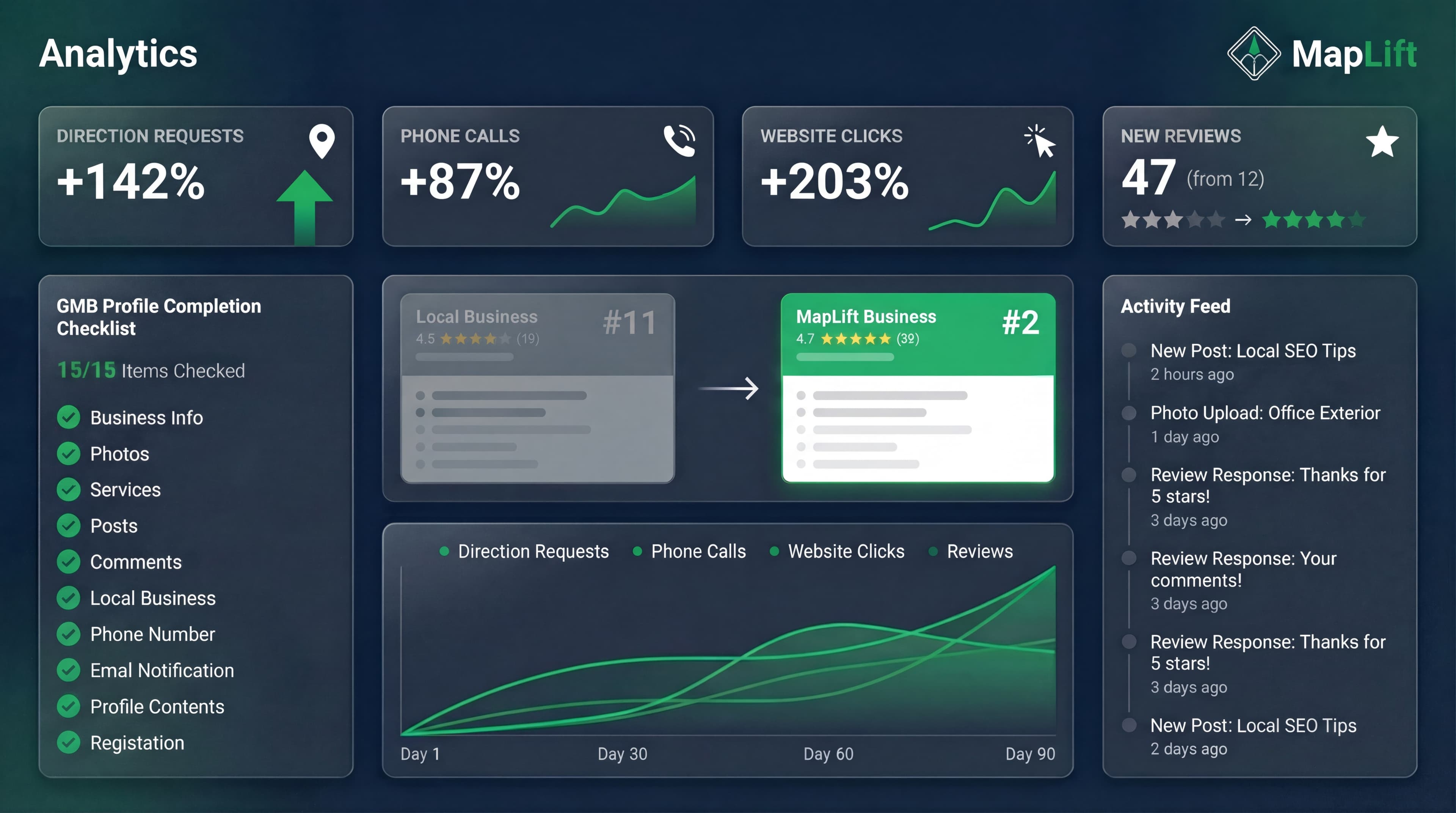
I tested these 15 strategies with a restaurant in Koramangala (Bangalore). In 90 days:
- Direction requests: +142 percent
- Phone calls: +87 percent
- Website clicks: +203 percent
- New reviews: 47 (from 12)
The best part? Every single tip takes less than 30 minutes to implement.
This is not theory. These are the exact tactics I use with MapLift clients who've seen similar results. Let's dive into the checklist.
Section 1: Foundation - Get These 5 Right First (0-30 Minutes)
1. Complete Your Profile to 100 percent
Why it works: Businesses with complete profiles are 70 percent more likely to attract location visits.
The 15-Minute Checklist
India-specific tip: Add Hindi business name in the "Additional names" section if you serve local customers.
2. Choose Your Primary Category Like Your Revenue Depends On It
The data: Primary category is the number 1 ranking factor for local pack according to Whitespark's 2026 survey of 149 factors.
How to pick the right one:
- Google "[your service] near me" (e.g., "Italian restaurant near me")
- Check what category your top 3 competitors use
- If they rank well and use "Italian Restaurant" (not "Restaurant"), use that exact category
Common mistake: Using a broad category like "Restaurant" when "South Indian Restaurant" or "Fast Food Restaurant" would be more specific.
MapLift case study: We switched a salon from "Beauty Salon" to "Hair Salon" (their primary service). Ranking jumped from position 8 to position 3 in the local pack within 21 days.
3. Write a Keyword-Rich Description (Without Sounding Robotic)
The 500-character formula:
First 100 characters: What you do + location (Google shows this in search)
Next 200 characters: Your unique value (why choose you over competitors)
Final 200 characters: Services + keywords naturally woven in
Example for a Bangalore dental clinic:
"Modern dental clinic in Indiranagar offering painless root canals, teeth whitening, and Invisalign. We've served 3,000+ patients since 2019 with same-day appointments and 0 percent EMI options. Services: cosmetic dentistry, dental implants, orthodontics, emergency dental care. Open 7 days, parking available."
4. NAP Consistency Across India's Top Directories
NAP = Name, Address, Phone
If your GBP says "Khan's Biryani House" but Justdial says "Khans Biryani House" (no apostrophe), Google sees these as different businesses.
The 20-minute audit:
- Check your business name, address, phone on: Google Business Profile, Justdial, Sulekha, IndiaMART (if B2B), Yellow Pages India, Facebook Business Page
- Make them identical (character-by-character)
Pro tip: Use the same phone format everywhere. If GBP has "+91-80-1234-5678", use that exact format on all platforms.
5. Upload 10 High-Quality Photos in Your First Week
The impact: Businesses with quality photos get 42 percent more direction requests and 35 percent more website clicks.
The 10-photo starter pack:
- Logo (square, 720x720px minimum)
- Cover photo (landscape, 1024x576px)
- Storefront exterior (daytime, clear signage)
- Interior (3-4 different angles)
- Products/menu items (3-4 top sellers)
- Team photo (builds trust)
- Action shot (customers enjoying your service)
2025 India hack: Take photos on your phone with location services ON. Geo-tagged photos get a ranking boost in local searches.
Section 2: Advanced Tactics - The 20 percent That Drives 80 percent of Results
6. Post 3-4 Times Weekly (Yes, Like Social Media)
Why this works in 2025: Google's algorithm now prioritizes activity over completion. A complete but dormant profile ranks lower than an active one.
What to post:
- Monday: Weekly special offer ("10 percent off all services this week - mention this post")
- Wednesday: Product/service highlight with photo
- Friday: Customer success story or review screenshot
- Weekend: Event or announcement
Time investment: 5 minutes per post using templates.
7. Respond to EVERY Review Within 24 Hours
The trust factor: 78 percent of Indian consumers trust businesses that engage with reviews - positive AND negative.
Response formula for positive reviews:
Response formula for negative reviews:
8. Enable WhatsApp Messaging (India-Exclusive Feature)
New in 2025: Google Business Profile now allows WhatsApp and text messaging integration for Indian businesses.
How to set it up:
- Go to your GBP dashboard → "Edit profile"
- Click "Add chat"
- Select "WhatsApp" and enter your business WhatsApp number
- Enable "Text messaging" for non-WhatsApp users
Why this matters: 95.4 percent of mobile users in India use Android, and WhatsApp is their default communication app. Making it 1-click easy to reach you = more conversions.
9. Use Q and A to Control Your Narrative
The hidden ranking factor: Google uses Q and A content to understand your business better and match you to relevant searches.
The proactive strategy:
- Ask yourself 5-7 common questions customers have
- Post them from a secondary Google account
- Answer them comprehensively from your business account
10. Add Service Menus with Prices (Transparency Wins)
Why transparency matters: When users search "teeth whitening cost in Bangalore", they're close to booking. Showing prices captures them.
MapLift data: Profiles with service prices listed get 23 percent more booking button clicks than those without.
Smart pricing strategy:
- Entry-level service: Show exact price (₹299)
- Mid-tier: Show range (₹800-₹1,500)
- Premium: "Starting from ₹2,000" or "Custom pricing"
Section 3: Common Mistakes That Tank Your Rankings
11. Don't Keyword-Stuff Your Business Name (2025 Crackdown)
What's happening: Google conducted a major cleanup in late 2024, suspending thousands of profiles with keyword-stuffed names.
Wrong:
"Sharma Dental Clinic | Best Dentist Bangalore | Root Canal Specialist"
Right:
"Sharma Dental Clinic"
Penalty: Suspension + loss of all reviews. Not worth the risk.
12. Update Your Hours During Festivals (Indian Businesses Miss This)
The problem: Google shows "Hours might differ" during Diwali, Holi, Eid, Christmas if you don't update special hours.
The fix:
- GBP dashboard → "Hours" → "Add special hours"
- Add closures or modified hours for all major festivals
- Do this 2 weeks in advance
Why it matters: 40 percent of daily searches in India are local, often "is [business] open today" during festival season.
13. Don't Ignore Google's New Video Verification
2025 requirement: Google now requires video verification for new profiles to combat fake listings.
What they ask for:
- • Video walkthrough of your business location
- • Show business signage clearly
- • Demonstrate your address matches the physical location
Timeline: Verification can take 5-14 days. Don't wait until you urgently need the profile active.
14. Avoid Hidden Addresses (Unless You're Service-Based)
The ranking penalty: Businesses with hidden addresses rank lower because Google assumes less legitimacy.
When to hide: Home-based businesses (massage therapist, consultant), Service-area businesses with no storefront (plumber, electrician)
When NOT to hide: Restaurants, retail stores, clinics, salons, Any business where customers visit you
15. Don't Let Your Profile Go Stale (Weekly Maintenance equals 10 Minutes)
The activity signal: Google's 2025 algorithm rewards fresh content and engagement signals.
The 10-minute weekly routine:
- • Monday: Check for new reviews, respond to all
- • Wednesday: Add 1-2 new photos
- • Friday: Publish 1 Google Post
- • Ongoing: Answer Q and A questions within 24 hours
Set a calendar reminder: "GMB Maintenance - Every Friday 11 AM"
FAQ - Your Top 7 Questions Answered
How long does it take to see ranking improvements?
How many reviews do I need to rank in the top 3?
Should I create separate profiles for multiple locations?
Can I delete negative reviews?
Does MapLift help with all these tips?
How often should I update my Google Business Profile?
What's the number 1 mistake Indian businesses make with GMB?
Sources & References
- Guidelines for representing your business on Google- Google
- Local Consumer Review Survey- BrightLocal
- Local SEO Educational Resources- Moz
- Local Search Ranking Factors- Whitespark
Your 30-Day Action Plan
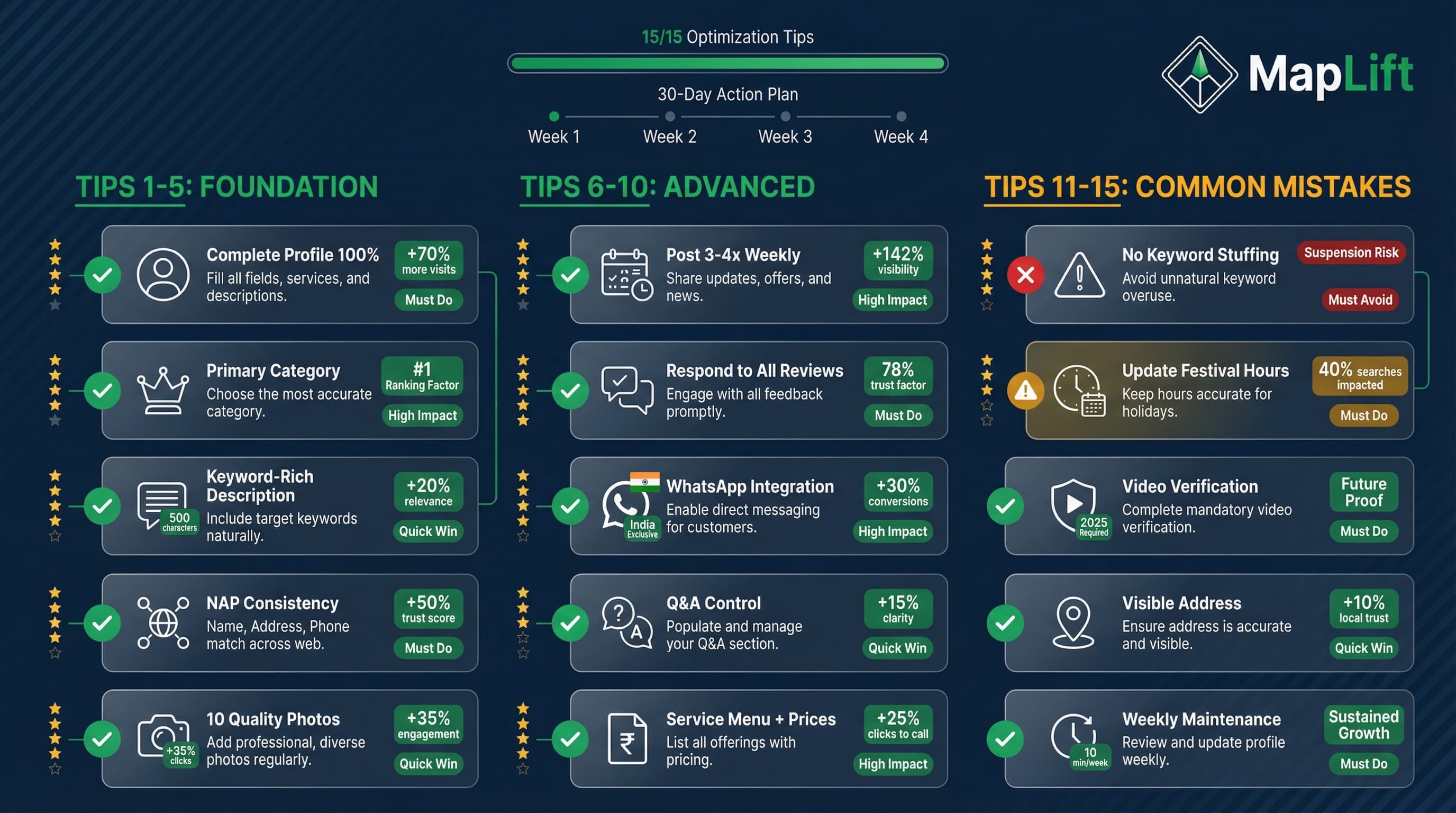
You don't need to implement all 15 tips today. Here's your priority roadmap:
Week 1: Foundation (Tips 1-5)
Week 2: Engagement (Tips 6-8)
Week 3: Optimization (Tips 9-10)
Week 4: Maintenance (Tips 11-15)
Expected Results by Day 30
Related Blog Posts
Explore more strategies to boost your Google Maps rankings and local visibility.
Keep reading
Ready to act on this? What MapLift does — every feature, and which plan carries it.