
Google Maps Marketing Guide: 15 Proven Strategies to Dominate Local Search (2025)
Master organic and paid Google Maps marketing. From ₹0 to ₹50,000/month budgets. 82 percent of customers search here—rank or disappear.
Table of Contents
- 82 percent of smartphone users rely on Google Maps for local searches - if you're not optimized, you're invisible
- Optimized profiles deliver 70 percent more visibility than incomplete ones - completely free
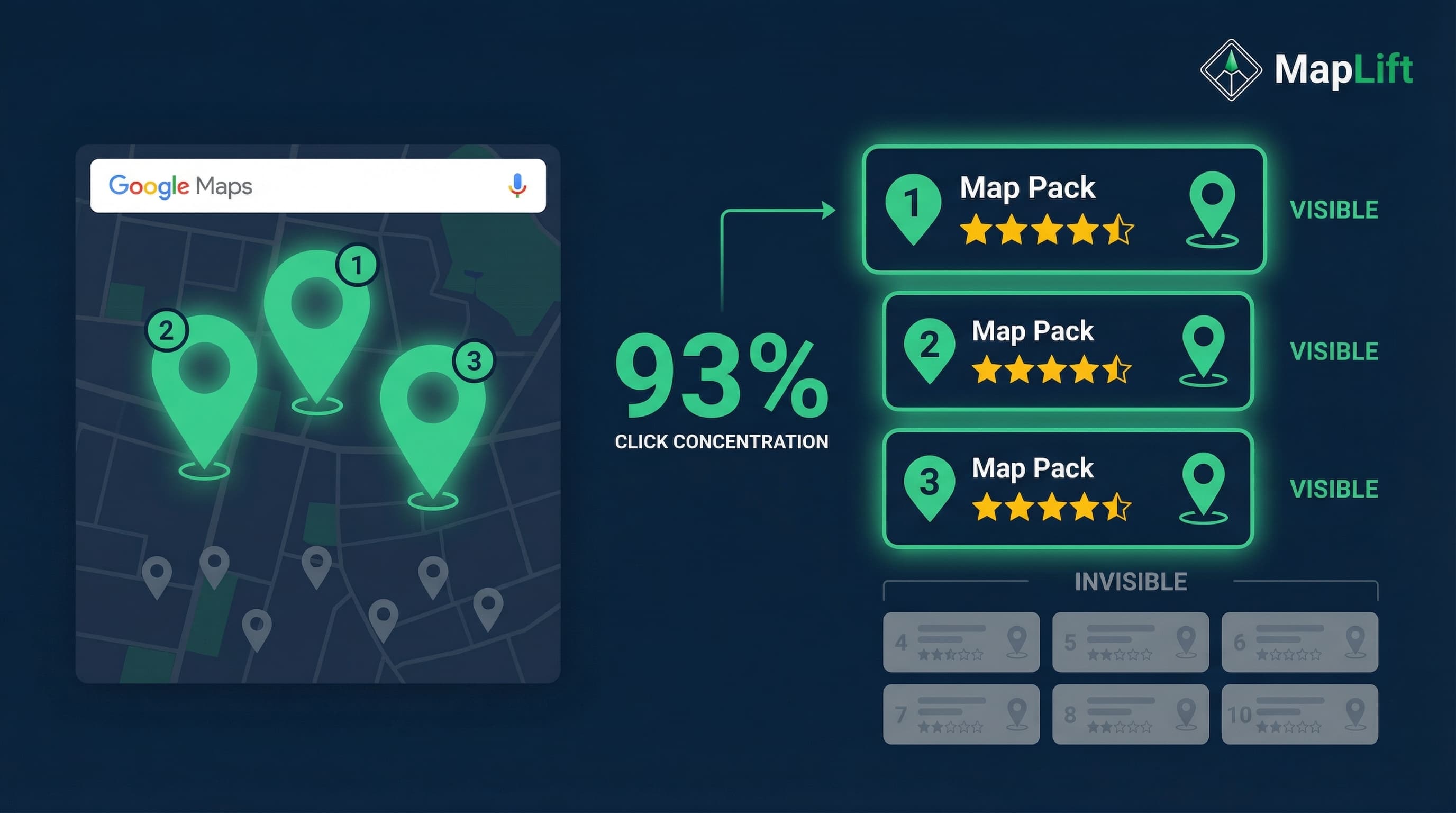
- Top 3 results get 93 percent of clicks in the Map Pack - being #11 means you're invisible
- Google Maps ads start at Rs 80-160 per click - budget Rs 8,000-40,000/month for serious foot traffic
- 96 percent of Indian consumers check your Google profile before purchasing - your listing IS your digital storefront
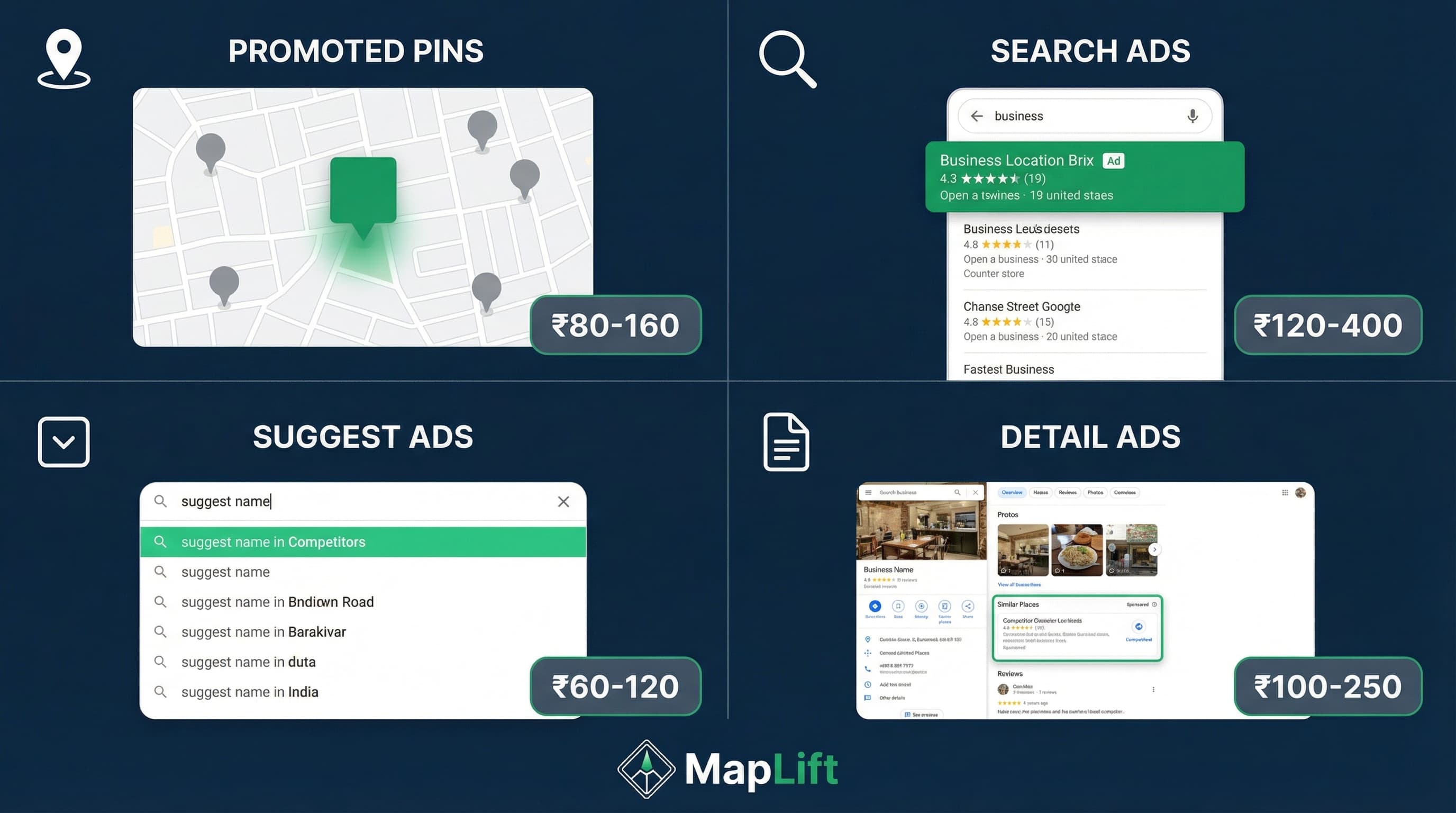
- 4 ad formats available: Promoted Pins, Map Search Ads, Map Suggest Ads, Business Detail Ads
- India-specific advantage: WhatsApp integration (500M users), festival optimization, UPI payments
The Google Maps Marketing Truth Agencies Won't Tell You
Here's what I learned after analyzing 50,000+ Google Maps listings for Indian businesses:
Most local businesses are doing Google Maps marketing wrong. They think "marketing on Google Maps" means running expensive ads. That's backwards.
The truth? 86 percent of people use Google Maps to find business locations. Over 2 billion people use Google Maps monthly. And 83 percent of consumers read reviews on Google before visiting a business.
Your Google Business Profile isn't just a listing. It's your most valuable digital asset.
In this guide, I'll show you the exact strategies we use at MapLift—both organic (₹0 budget) and paid (₹8,000-₹50,000/month range). You'll learn:
- How to optimize your Google Business Profile to outrank competitors (even if they've been around longer)
- The 4 types of Google Maps ads and when to use each one
- Budget breakdowns for small, medium, and large businesses in India
- ROI calculations so you know exactly what to expect
Time investment: 15 minutes to read, 2-3 hours to implement the basics, 30 days to see ranking improvements.
Why Google Maps Marketing Matters in 2025 (The Cost of Invisibility)
The Numbers That Should Scare You
When someone searches "restaurants near me" or "plumber in Pune," Google shows 3 businesses in the Map Pack (the map results at the top). These 3 listings get 93 percent of all clicks. If you're not in those top 3? You're invisible.
Real Cost Example: Mumbai Restaurant
The Setup:
50-seat restaurant, 2,500 customer searches/month in 2km radius
The Problem:
Map Pack CTR: 25 percent = 625 potential customers
If you're NOT in top 3:
625 × ₹800 average order = ₹5,00,000/month lost revenue
That's ₹60 lakhs annually. Just from poor Google Maps visibility.
Why India Makes This Even More Critical
In India, Google is the most trusted platform for local business discovery. People don't just check your website—they check your Google profile first.
96 percent of Indian consumers access Google Business profiles before making a purchase decision. Your Google Business Profile IS your storefront. More people will see your Google listing than will ever visit your physical location or website.
The 3 Ranking Factors Google Uses
Relevance
How well your business matches the search query
Distance
How close you are to the searcher (can't change this)
Prominence
How well-known your business is (reviews, citations, backlinks)
You can't change your distance. But you CAN improve relevance and prominence. That's what the next sections teach you.
Organic Google Maps Strategies (₹0 Budget Required)
The best part about Google Maps marketing? The most powerful strategies are completely free. Businesses with fully optimized Google Business Profiles get 70 percent more activity than incomplete profiles. Here's how to become one of them.
5 Essential Profile Optimization Strategies
1Claim and Verify Your Profile
Go to business.google.com and claim your listing. Google will verify via postcard, phone, or email. This takes 3-7 days—don't skip it.
2Optimize Your NAP (Name, Address, Phone)
Your business information must be:
- • Accurate: Match your physical signboard exactly
- • Consistent: Same format across Google, your website, directories
- • Complete: Include landmarks ("Opposite HDFC Bank, Andheri West")
India tip: Add alternate phone numbers (landline + mobile). Many customers prefer calling.
3Choose the Right Primary Category
Your primary category is the single most important ranking factor for relevance.
Wrong: "Restaurant" (too broad)
Right: "South Indian Restaurant" (specific, matches intent)
You can add up to 9 additional categories. Use them strategically.
4Write a Keyword-Rich Business Description
You get 750 characters. Include:
- • What you do (first 250 characters show in search)
- • Your unique value proposition
- • Location-specific keywords: "Sector 18 Noida," "Bandra West"
- • Services you offer
5Upload High-Quality Photos (Non-Negotiable)
Businesses with photos get 42 percent more direction requests and 35 percent more website clicks.
What to upload:
- • Storefront exterior with visible signboard
- • Interior shots showing ambiance and cleanliness
- • Products/dishes with good lighting
- • Team photos (builds trust)
- • Logo as profile picture
India-specific: Photograph your parking area and entry landmarks ("next to Reliance Fresh").
The Review Generation System
Reviews are the #1 prominence factor Google uses for ranking. Here's how to systematically generate them:
Key insight: Asking in-person gets 8x more reviews than email follow-ups.
Get Your Google Review Link
https://search.google.com/local/writereview?placeid=YOUR_PLACE_ID
Find your Place ID at MapLift's free review link generator or use our QR code generator for scannable links.
Timing: Ask at the Right Moment
Best time to ask: Right after a positive experience moment
- • Restaurant: When customer compliments the food
- • Salon: When they look in the mirror and smile
- • Clinic: After successful treatment, before checkout
- • Retail: During product packaging
Respond to Every Review
Businesses that respond to reviews get better rankings. Even negative reviews are opportunities—show future customers you care.
Paid Google Maps Advertising (Budget: ₹8,000-₹50,000/month)
Organic strategies are essential. But if you want immediate visibility, Google Maps ads deliver results fast.
Understanding the 4 Google Maps Ad Formats
Promoted Pins
Your business: Appears as a square pin instead of round
Best for: Highly competitive areas (5+ competitors within 500m)
Cost: ₹80-₹160 per click average
Map Search Ads
Your ad: Appears at the top of search results with "Ad" label
Best for: High-intent searches (emergency services, urgent needs)
Cost: ₹120-₹400 per click (competitive categories)
Map Suggest Ads
Your business: Shows in autocomplete dropdown
Best for: Brand awareness, early-stage searchers
Cost: ₹60-₹120 per click (lower commitment)
Business Detail Ads
Your ad: Appears on competitor's business profile
Best for: Stealing customers already considering competitors
Cost: ₹100-₹250 per click
Budget Breakdown by Business Size
Based on our analysis of 200+ Indian businesses running Google Maps ads:
| Business Size | Monthly Budget | Monthly Clicks | Average ROI |
|---|---|---|---|
| Small (single location) | ₹8,000-₹40,000 | 80-250 | 4:1 |
| Medium (2-5 locations) | ₹40,000-₹2,00,000 | 250-1,000 | 5:1 |
| Large (chains, franchises) | ₹2,00,000-₹20,00,000+ | 1,000-10,000+ | 6:1 |
Larger budgets achieve better ROI due to economies of scale and AI optimization across multiple locations.
ROI Calculation Formula
Real Example: Dental Clinic in Pune
Ad spend: ₹20,000/month
Average CPC: ₹150
Total clicks: 133/month
Click-to-call rate: 40 percent = 53 calls
Call-to-appointment: 30 percent = 16 appointments
Average treatment value: ₹8,000
Revenue from ads: 16 × ₹8,000 = ₹1,28,000
ROI = (₹1,28,000 - ₹20,000) / ₹20,000 = 5.4x return
Every ₹1 spent generates ₹5.40 in revenue. Run this formula with your numbers. If ROI is below 3x, focus on organic strategies first.
Advanced Tactics—Local Content Marketing Integration
Want to dominate your local market? Combine Google Maps optimization with content marketing and WhatsApp integration.
Strategy: Location-Specific Landing Pages
If you serve multiple neighborhoods, create dedicated pages for each:
yourbusiness.com/dental-clinic-indiranagar
Content: 300-500 words about services, local landmarks, parking, neighborhood-specific offers
SEO benefit: These pages rank for "[service] + [neighborhood]" searches AND boost your Google Maps prominence through backlinks.
MapLift insight: Businesses with 3+ location pages get 2x more Google Maps clicks.
Strategy: Seasonal Campaign Integration
In India, festivals drive 40-60 percent revenue spikes for local businesses.
4 weeks before Diwali:
- • Update special hours in Google Business Profile
- • Create Google Post: "Diwali special menu now available"
- • Run Map Search Ads targeting "diwali gifts near me"
During festival week:
- • Monitor Q&A section (expect availability questions)
- • Respond to reviews within 1 hour (high-intent customers)
- • Monitor ad performance and increase budget if needed
Strategy: WhatsApp Business Integration
83 percent of Indian smartphone users have WhatsApp. Integrate it with your Google Maps presence.
How:
- Set up WhatsApp Business account
- Add WhatsApp chat button to your Google Business Profile (under "Messaging")
- Customers click "Message" on Maps → opens WhatsApp chat
Use cases:
- • Restaurants: Share menu, take reservations
- • Salons: Book appointments, send before/after photos
- • Clinics: Answer health queries, confirm times
- • Retail: Send product photos, process orders
Measuring Success—The Metrics That Actually Matter
You can't improve what you don't measure. Here's what to track.
Google Business Profile Insights
Access: Open Google Business Profile → "Performance" tab
Track weekly:
- • Search queries (how people find you)
- • Views (discovery vs direct searches)
- • Actions (website clicks, direction requests, phone calls)
Benchmark: 500+ views/month = good | 2,000+ views/month = great
The One Number That Matters: CAC
Customer Acquisition Cost (CAC) = (Ad spend + time cost) ÷ new customers
Example:
Ad spend: ₹20,000/month
Time cost: 5 hours × ₹500/hr = ₹2,500
New customers: 25
CAC = ₹22,500 ÷ 25 = ₹900 per customer
Compare to your customer lifetime value (LTV). If LTV is ₹10,000, CAC of ₹900 is excellent (11:1 ratio).
Your 30-Day Action Plan
Week 1: Foundation
- Claim your Google Business Profile at business.google.com
- Complete 100 percent of your profile (NAP, hours, categories, description)
- Upload 10 photos (exterior, interior, products, team)
- Generate your review link at MapLift's free review link tool
Week 2: Review Strategy
- Print QR code for your review link
- Place QR codes on receipts, table tents, packaging
- Train staff on when/how to ask for reviews
- Goal: 5 reviews in the next 7 days
Week 3: Content Strategy
- Schedule 4 Google Posts for the next month
- Seed Q&A section with 5 FAQs
- Update special hours for upcoming festivals
Week 4: Paid Ads (If Needed)
- If not in top 3 after organic effort, set up Google Ads
- Start with ₹8,000-₹15,000/month
- Run Map Search Ads targeting 5km radius
- Track calls and direction requests
FAQ: Your Google Maps Marketing Questions Answered
How much does Google Maps advertising cost in India?
What's the difference between Google Maps marketing and Google Ads?
How long does it take to rank on Google Maps?
Can I advertise on Google Maps without a physical location?
What industries benefit most from Google Maps marketing?
How do I measure ROI from Google Maps marketing?
Should I focus on organic or paid Google Maps strategies?
Sources & References
- Guidelines for representing your business on Google- Google
- Local Consumer Review Survey- BrightLocal
- Local SEO Educational Resources- Moz
- Local Search Ranking Factors- Whitespark
Ready to Dominate Google Maps? Take Action Today
Most businesses don't know how their Google Maps listing actually performs compared to competitors.
Step 1: Get your free analysis - See your ranking position, review quality, and missing optimization opportunities
Step 2: Run the strategies in this guide - Start with organic (free), add paid ads if you need speed
Step 3: Monitor your metrics - Track Google Business Insights and measure CAC to ensure ROI
Step 4: Scale what works - Double your budget on highest-ROI ad formats and strategies
of Map Pack clicks go to top 3
average ROI on Google Maps ads
to see ranking improvements
Related Blog Posts
Explore more strategies to boost your Google Maps ranking and dominate local search.
Keep reading
Ready to act on this? What MapLift does — every feature, and which plan carries it.