
Review Schema Markup: Complete Implementation Guide for Local Businesses
Review schema markup unlocks star ratings in Google search results and feeds structured signals into AI Overviews. This guide covers every schema type, every eligibility rule, every line of code, and the critical self-serving reviews restriction that most Indian businesses get wrong.

Table of Contents
TL;DR — Key Takeaways
Review schema markup is JSON-LD code that unlocks star ratings in search
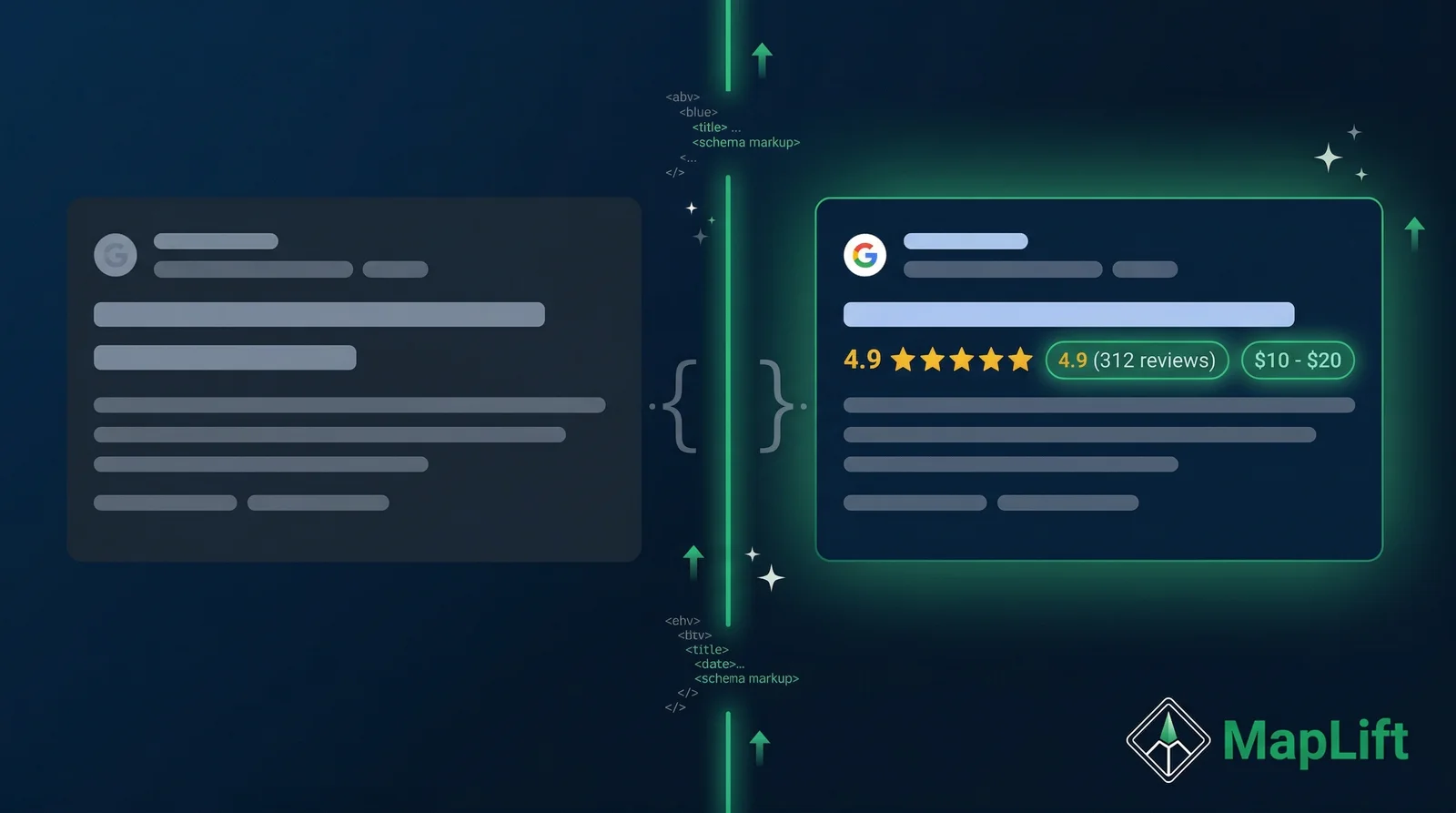
It tells Google the rating value, review count, review text, and author — and generates the gold stars you see under search results. Pages with review rich snippets average 15–30% higher click-through rates.
Local businesses cannot show stars for their own Google reviews
Google's self-serving reviews rule (2019) blocks star snippets for LocalBusiness and Organization schema when the business controls the reviews. The workaround: mark up individual services or menu items as Product schema instead.
AggregateRating must be nested inside a parent schema type
A standalone AggregateRating block does not qualify for rich results. Nest it inside Product, Recipe, Book, or another eligible type. This is the most common implementation mistake.
Review schema feeds AI Overviews — not just rich snippets
Pages with structured data earn AI citations at 2.7x the rate of pages without it. The reviewBody property is semantic content that AI answer engines actively extract and reference.
Always test with Google Rich Results Test before going live
The tool renders your page fully (including JavaScript) and confirms eligibility before Google crawls your production URL. Run it every time you modify schema.
If you've ever searched for a product on Google and seen those gold stars beneath a result before you even click — that's review schema markup doing its job.
Structured data is code you add to a page to help Google understand the content on it. When it comes to reviews, that code follows a vocabulary defined at schema.org and tells Google: here is a rating, here is who gave it, here is what they said, and here is the overall average. Google uses that information to display rich snippets — star ratings, review counts, and rating values — directly in the search results page.
I've worked with dozens of Indian local businesses on their structured data implementations, and review schema is consistently one of the most misunderstood areas. People either don't implement it at all, leaving rich snippet opportunities on the table, or they implement it on pages where Google explicitly will not honor it, wasting developer time and potentially drawing a manual penalty.
This guide fixes both problems. You'll get exact JSON-LD code for each review schema type, a plain-English explanation of Google's eligibility rules, and a clear checklist for testing your implementation. You'll also understand how structured data now feeds Google's AI Overviews and AEO signals in 2026 — which makes getting this right more valuable than ever.
What Is Review Schema Markup?
Review schema markup is structured data that describes reviews and ratings using the schema.org vocabulary. It communicates four things to search engines in a machine-readable format.
What is being reviewed
The product, service, recipe, book, or other reviewable item with its name and type.
Who wrote the review
The author with @type: Person and a real name — anonymous authors fail validation.
What rating they gave
The numeric ratingValue within a declared worstRating-to-bestRating scale.
What the overall average is
The AggregateRating with ratingValue and reviewCount, nested inside the parent type.
Why It Matters
15–30% higher click-through rates
Pages with review rich snippets consistently outperform plain listings. Star ratings give users quality confirmation before they click, which increases qualified traffic.
AI Overviews citation signal
Structured review data feeds Google's AI systems. Pages with schema earn AI citations at 2.7x the rate of unstructured pages, according to a 2025 Norg.ai analysis of 50 sites.
Entity disambiguation for Knowledge Panel
Well-structured schema helps Google's knowledge graph understand your business as a distinct entity — improving your Knowledge Panel accuracy and local pack visibility.
The Three Schema Types You Need to Know
Review schema isn't a single type — it's a family of related types. Each serves a distinct purpose and the rules for each differ.

1. Review (schema.org/Review)
The Review type represents a single customer review. Use it when marking up one specific review — typically the most helpful or representative one — for a product or service. It requires itemReviewed, reviewRating, and author.
Review schema — JSON-LD example
{
  "@context": "https://schema.org",
  "@type": "Review",
  "itemReviewed": {
    "@type": "Product",
    "name": "Tandoori Chicken — Full Plate"
  },
  "reviewRating": {
    "@type": "Rating",
    "ratingValue": "5",
    "bestRating": "5",
    "worstRating": "1"
  },
  "author": {
    "@type": "Person",
    "name": "Priya Deshmukh"
  },
  "reviewBody": "Best tandoori chicken in Pune — perfectly charred, not dry at all, and the mint chutney is outstanding.",
  "datePublished": "2026-01-15"
}
2. AggregateRating (schema.org/AggregateRating)
The AggregateRating type represents the overall average rating across many reviews. This is what generates the widely-recognized star display (“4.6 ★ | 238 reviews”) in search results. Critically: AggregateRating must always be nested inside a parent schema type — it does not stand alone.
AggregateRating nested in Product schema — JSON-LD example
{
  "@context": "https://schema.org",
  "@type": "Product",
  "name": "Shree Krishna Masala Dosa",
  "description": "Classic masala dosa with spiced potato filling, served with coconut chutney and sambar.",
  "aggregateRating": {
    "@type": "AggregateRating",
    "ratingValue": "4.7",
    "reviewCount": "142",
    "bestRating": "5",
    "worstRating": "1"
  }
}
Most common mistake: Adding a standalone AggregateRating block without a parent type. Google will not generate rich results for orphaned AggregateRating schema — it needs a parent like Product, Recipe, or Book.
3. LocalBusiness (schema.org/LocalBusiness) — The Restricted Type
LocalBusiness schema is essential for local SEO — it communicates your business name, address, phone, hours, and category. But there is a critical restriction that affects every Indian local business that tries to add review stars to their website:
Google's Self-Serving Reviews Rule
Google does not display review rich snippets for LocalBusiness or Organization schema types when the entity being reviewed controls the reviews about itself. This rule was introduced in September 2019. Your own Google reviews, Facebook reviews, or any review feed you manage cannot generate stars in organic search results via this schema type.
LocalBusiness schema is still valuable — it helps Google understand your NAP, operating hours, and business category, which feeds your Knowledge Panel and local pack rankings. Use it. Just don't add it expecting review stars.
LocalBusiness schema (Restaurant subtype) — JSON-LD example
{
  "@context": "https://schema.org",
  "@type": "Restaurant",
  "name": "Sai Sagar Restaurant",
  "address": {
    "@type": "PostalAddress",
    "streetAddress": "42 FC Road",
    "addressLocality": "Pune",
    "addressRegion": "MH",
    "postalCode": "411004",
    "addressCountry": "IN"
  },
  "telephone": "+91-20-25445678",
  "priceRange": "\u20B9\u20B9",
  "servesCuisine": "South Indian",
  "openingHoursSpecification": [{
    "@type": "OpeningHoursSpecification",
    "dayOfWeek": ["Monday","Tuesday","Wednesday","Thursday","Friday"],
    "opens": "11:00",
    "closes": "22:30"
  }]
}Eligibility Rules: What Can and Cannot Show Review Stars
Understanding eligibility before implementation saves hours of debugging and protects you from manual actions. Here are the rules as Google has documented them.
Pages That ARE Eligible
Products
Individual product pages on e-commerce or business sites — including services marked up as Product schema.
Recipes
Recipe pages with ingredient, instruction, and nutrition markup.
Books
Book pages with author, publisher, and ISBN data.
Movies, TV Episodes, Software Apps
Content types with defined schema types and discrete, reviewable items.
Services as Products
A grooming package, consulting service, or dental treatment marked up as a Product type.
Pages That Are NOT Eligible
LocalBusiness pages (self-reviewing)
Business websites marking up their own Google, Facebook, or any controlled review feed.
Organization pages
Same self-serving restriction applies to Organization type and all subtypes.
Pages with hidden reviews
Markup must match what is visible on the page — not what is in a database.
Pages with fewer than 5 reviews
Google's practical threshold — fewer than 5 reviews rarely generate rich snippets.
The Third-Party Review Workaround
There is a legitimate path to review rich snippets for local businesses: use third-party review data, not your own self-managed reviews. If a review aggregator provides an embeddable widget or data feed that you display on your site, and that data is genuinely from an independent third-party system, Google may honor it. The critical distinction: the reviewing entity must be independent from the reviewed entity.
For most Indian local businesses, the most practical approach is to mark up individual service offerings or menu items as Product schema with aggregateRating, using ratings that are honestly representative and visible on the page.
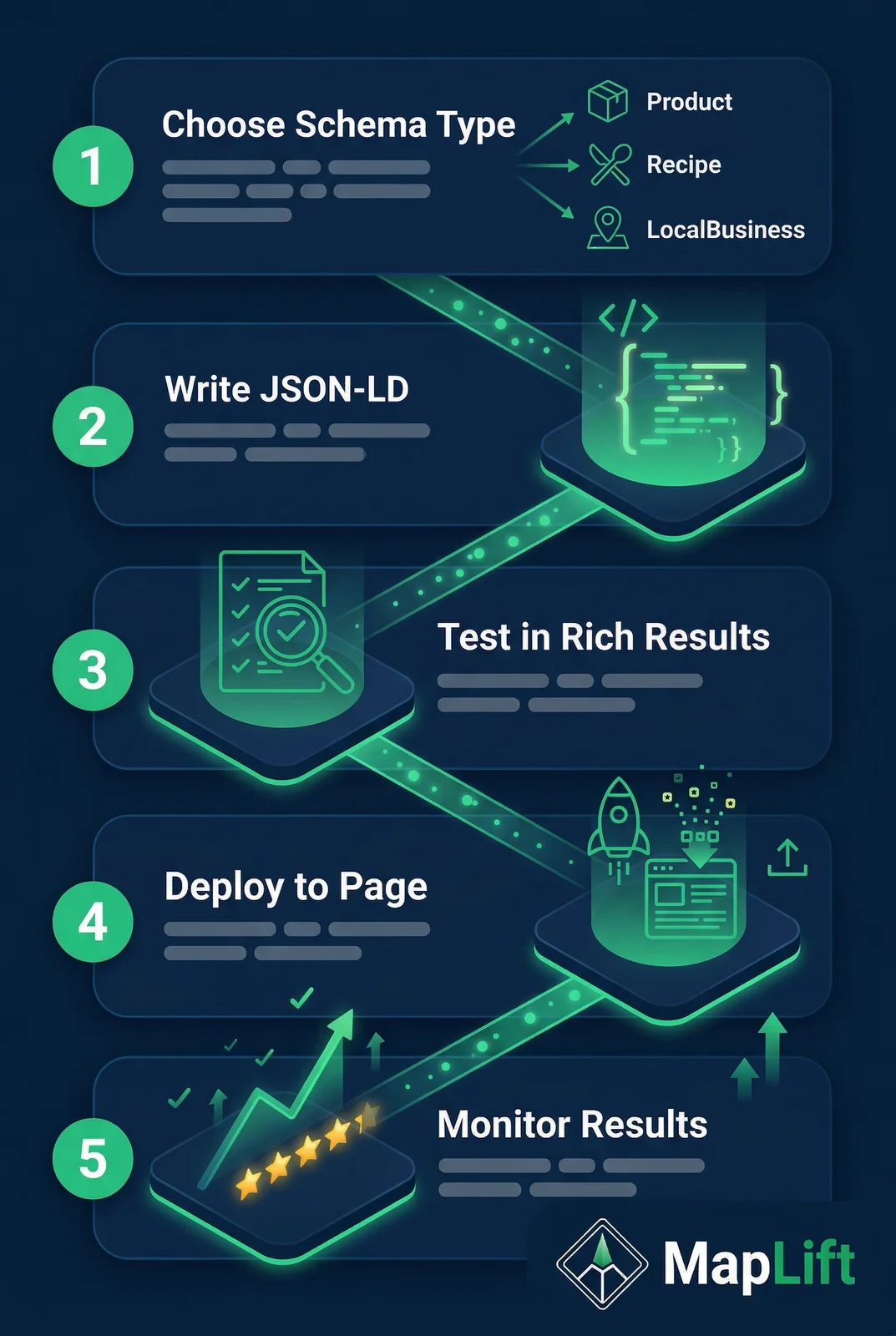
Step-by-Step JSON-LD Implementation
Choose JSON-LD — always
Google explicitly recommends JSON-LD as the preferred format. It goes in a <script> tag in your page head, completely separate from your HTML. This makes it easier to maintain and update without touching page content. Microdata and RDFa work but are harder to maintain in JavaScript frameworks.
Nest AggregateRating inside a parent type
The single most common mistake: adding a standalone AggregateRating block. It must be a property inside Product, Recipe, Book, or another eligible parent type. Here is the correct pattern for a restaurant menu item:
{
  "@context": "https://schema.org",
  "@type": "Product",
  "name": "Butter Chicken — Half Plate",
  "description": "Slow-cooked chicken in rich tomato cream sauce, served with two butter naan.",
  "aggregateRating": {
    "@type": "AggregateRating",
    "ratingValue": "4.8",
    "reviewCount": "96",
    "bestRating": "5",
    "worstRating": "1"
  },
  "review": [{
    "@type": "Review",
    "reviewRating": { "@type": "Rating", "ratingValue": "5", "bestRating": "5" },
    "author": { "@type": "Person", "name": "Ankit Sharma" },
    "reviewBody": "The butter chicken sauce is genuinely the richest I have had in Hyderabad.",
    "datePublished": "2026-02-03"
  }]
}Place the script tag in your page head
In a Next.js or React application, define your schema as a constant and inject it with dangerouslySetInnerHTML inside a script tag:
const reviewSchema = { /* your schema object */ }

<script
  type="application/ld+json"
  dangerouslySetInnerHTML={{ __html: JSON.stringify(reviewSchema) }}
/>Ensure schema matches visible page content
Every rating and review in your schema must be visible to users on the same page. If your schema says reviewCount: 96 but the page only shows 3 reviews, Google will flag this as a mismatch. Include only the reviews actually rendered on the initial page load.
If showing a paginated review list, only include in your schema the reviews rendered on the initial page load — not the total count in your database.
7 Mistakes That Get Markup Rejected
After auditing structured data implementations for multiple Indian business websites, these are the errors that appear most frequently — and most reliably block rich snippet eligibility.
Marking up Google Business reviews as first-party data
Adding your Google Maps aggregate rating to your website via LocalBusiness schema and expecting stars in search results. Google explicitly blocks this since 2019.
Fix: Mark up individual service offerings or menu items as Product schema instead.
Mismatched ratingValue and bestRating
Using a 10-point rating system but omitting bestRating (Google defaults to 5). An 8/10 rating displays as 8 out of 5, triggering validation errors.
Fix: Always explicitly declare bestRating and worstRating to match your actual rating scale.
Invisible reviews in schema
Including 50 reviews in schema but only displaying 5 on the page. Google's crawler compares DOM content to schema claims.
Fix: Only mark up reviews that are actually rendered on the page.
Standalone AggregateRating blocks
An AggregateRating without a parent type does not qualify for rich results. Google Search Console shows this as a warning.
Fix: Always nest AggregateRating inside Product, Recipe, Book, or another eligible parent.
Missing required author property
The Review type requires an author with @type: Person and a real name. Using "Anonymous" or omitting the property fails validation.
Fix: Include real reviewer names. If privacy is a concern, use first name and last initial.
Fake or inflated review counts
Claiming 500 reviews when you have 50 visible reviews violates Google's structured data spam policies.
Fix: Use only accurate, verifiable counts that match what users can see on the page.
Using Microdata with JavaScript-rendered reviews
If reviews load via React or Vue, Microdata attributes in HTML may not be present when the page first renders.
Fix: JSON-LD in a script tag is unaffected by render timing. Always use JSON-LD for JS frameworks.
Testing Your Implementation
Google Rich Results Test
search.google.com/test/rich-results
The official tool for checking whether your page qualifies for rich results. Fully renders your page — executing JavaScript — before parsing schema.
Schema Markup Validator
validator.schema.org
Checks structural correctness against the schema.org vocabulary — independent of Google's rich result policies. Use this first to catch structural errors.
Search Console Rich Results Report
search.google.com/search-console
Ground-truth feedback after going live. Shows valid pages, errors, and which pages Google is actually displaying as rich results in search.
Pre-Launch Implementation Checklist
How Review Schema Feeds AI Overviews in 2026
This is where review schema markup becomes strategically important beyond just rich snippets. Google's AI Overviews pull from structured data as an input signal — and the impact is measurable.
AggregateRating as a trust signal
When AI is summarizing a product or service category, machine-readable rating data gives it precise evidence. "4.8 stars from 312 reviews" is more AI-citable than unstructured praise.
reviewBody as semantic content
The reviewBody property contains natural-language text that AI systems extract as evidence. Specific outcome statements get cited in AI Overviews more than generic praise.
FAQ schema as a complement
Adding FAQPage schema alongside review schema creates a dual signal: ratings prove quality, FAQ content proves relevance to specific questions. Both feed AI citation rates.
2025 Research: Schema markup drives 2.7x higher AI citation rates
A 2025 study by Norg.ai analyzing 50 sites found that pages with FAQPage schema achieved a 41% citation rate in AI-generated responses versus 15% for pages without structured data. For Indian businesses competing in AI-driven local discovery, the combination of clean LocalBusiness schema (entity recognition) + Product schema with AggregateRating (rich snippets) + FAQPage schema (AI citation) creates the most complete structured data foundation available.
There is a direct connection between review quality and schema effectiveness. Garbage review text produces low-value schema. The reviewBody property contains natural-language text that AI systems extract as evidence for their answers. A review body saying “the physiotherapy sessions here resolved my knee pain after 8 weeks” is exactly the kind of specific, outcome-oriented content that AI answer engines cite.
This is why AI-generated review templates matter at the schema level, not just the reputation level. Templates that produce specific, descriptive customer language generate reviewBody content that AI systems actively reference. See how this works in practice in our complete Google reviews guide.
India-Specific Schema Implementation Tips
Working with Indian local businesses, I've identified implementation nuances that differ from Western-focused guides. These details matter for validation and for Knowledge Panel accuracy.
Currency in priceRange
The priceRange property uses symbols, not ISO codes. Use the rupee symbol directly.
"priceRange": "\u20B9\u20B9" // two rupee symbols = mid-rangeLanguage markup for multilingual businesses
If your page has Hindi or regional language content, add inLanguage to your Article schema for correct multilingual indexing.
"inLanguage": ["en-IN", "hi"]Phone number format
Use E.164 international format for better knowledge graph normalization and validation reliability.
"telephone": "+91-22-12345678"Address structure with PIN codes
Always include postalCode (6-digit PIN) and set addressCountry: "IN". Use ISO 3166-2 state codes for addressRegion.
"addressRegion": "MH" // Maharashtra, KA = Karnataka, TN = Tamil NaduGST number as identifier
For entity disambiguation, add your GSTIN as a PropertyValue identifier. Helps structured data parsers uniquely identify your business.
"identifier": { "@type": "PropertyValue", "name": "GSTIN", "value": "27AABCU9603R1ZM" }servesCuisine for restaurant subtypes
Restaurant schema supports servesCuisine with comma-separated values for multi-cuisine businesses. Use established cuisine terms.
"servesCuisine": "North Indian, Mughlai"Frequently Asked Questions
Can a local business get review stars in Google for their own Google reviews?
No. Since September 2019, Google does not display review rich snippets for LocalBusiness or Organization schema types where the reviewed entity controls the reviews. Your own Google Business Profile reviews, Facebook reviews, or any review feed you manage cannot generate stars in organic search results via this mechanism. The practical workaround is to mark up individual products or services as Product schema with aggregateRating, using ratings that are independently verifiable and visible on your page.
What is the minimum number of reviews needed for AggregateRating to show stars?
Google has not published an exact minimum, but in practice, fewer than 5 reviews rarely generate rich snippets. The safe threshold recommended by structured data specialists is a minimum of 5 genuine reviews with a reviewCount of at least 5. Below this threshold, Google may determine the sample size is insufficient to justify displaying an aggregate rating in search results.
Does review schema markup help with Google AI Overviews?
Yes, indirectly but meaningfully. Structured data — including Review and AggregateRating schema — provides machine-readable quality signals that AI systems use when constructing summaries. A 2025 analysis by Norg.ai found that pages with schema markup earned AI citations at 2.7 times the rate of pages without it. The reviewBody property is especially valuable: specific, outcome-oriented review text gets extracted and referenced by AI answer engines more often than generic star ratings.
What happens if my review schema has errors?
Errors prevent rich snippet eligibility. Google Search Console will show the affected pages under the Rich results report with an Invalid items status. Warnings may not prevent eligibility but should be fixed. The most common errors are: missing required author property, ratingValue outside the bestRating/worstRating range, reviewCount not matching visible reviews on the page, and AggregateRating not nested inside a parent schema type.
Is JSON-LD the only way to implement review schema?
No — Microdata and RDFa are also supported formats. However, Google explicitly recommends JSON-LD as the preferred method because it separates structured data from HTML content, is easier to implement in JavaScript frameworks like React and Next.js, and does not break when your HTML is edited. For any modern web framework, JSON-LD is the correct and recommended choice.
Does review schema work for Hindi-language or regional-language pages in India?
Yes. Schema.org properties accept values in any language — the reviewBody property can contain Hindi, Tamil, Telugu, or any other language text. For multilingual pages, add the inLanguage property to your Article schema to signal the language to Google's indexing system. Use values like 'en-IN' for Indian English, 'hi' for Hindi, 'ta' for Tamil, and 'te' for Telugu.
Review Schema Markup: The Strategic Payoff
Review schema markup is one of the few technical SEO investments that pays dividends across multiple dimensions simultaneously: richer search listings that increase click-through rates, improved AI citation rates for AI Overviews, stronger entity understanding for your Knowledge Panel, and a cleaner structured data foundation for voice and conversational search.
The implementation is straightforward once you understand the rules — particularly the self-serving reviews restriction that affects local businesses. Mark up what you're actually selling (products, services, menu items) rather than your business as a whole. Keep your visible content and your schema in sync. Test before you publish. That's the complete framework.
The next step is making sure the reviews you're collecting are worth marking up. MapLift's AI review templates generate language that's both persuasive for human readers and structurally valuable for machines. To compare tools, see our review software comparison or read about other AI tools for local businesses.
Sources & References
- Review Snippet Structured Data — Google Search Central- Google
- General Structured Data Guidelines — Google Search Central- Google
- Making Review Rich Results More Helpful — Google Search Central Blog- Google
- Review — schema.org Type Reference- schema.org
- AggregateRating — schema.org Type Reference- schema.org
- LocalBusiness Structured Data — Google Search Central- Google
- Rich Results Test — Google Search Console- Google
- Can Local Businesses Use Review Schema?- BrightLocal
- What Is Review Schema?- Semrush
- Schema Markup for AEO — Complete Implementation Guide- Norg.ai
Keep reading
Ready to act on this? What MapLift does — every feature, and which plan carries it.